Gloox for trainers
Your gym and online clients, all in one app
Build programs, see how each client trains and eats, adjust calorie and macro targets and get a weekly digest. Your clients train on your programs for free.
5.0 on the App Store
See how it works
On a computer? Point your phone's camera here to get the app.
In the gym and online,
one app
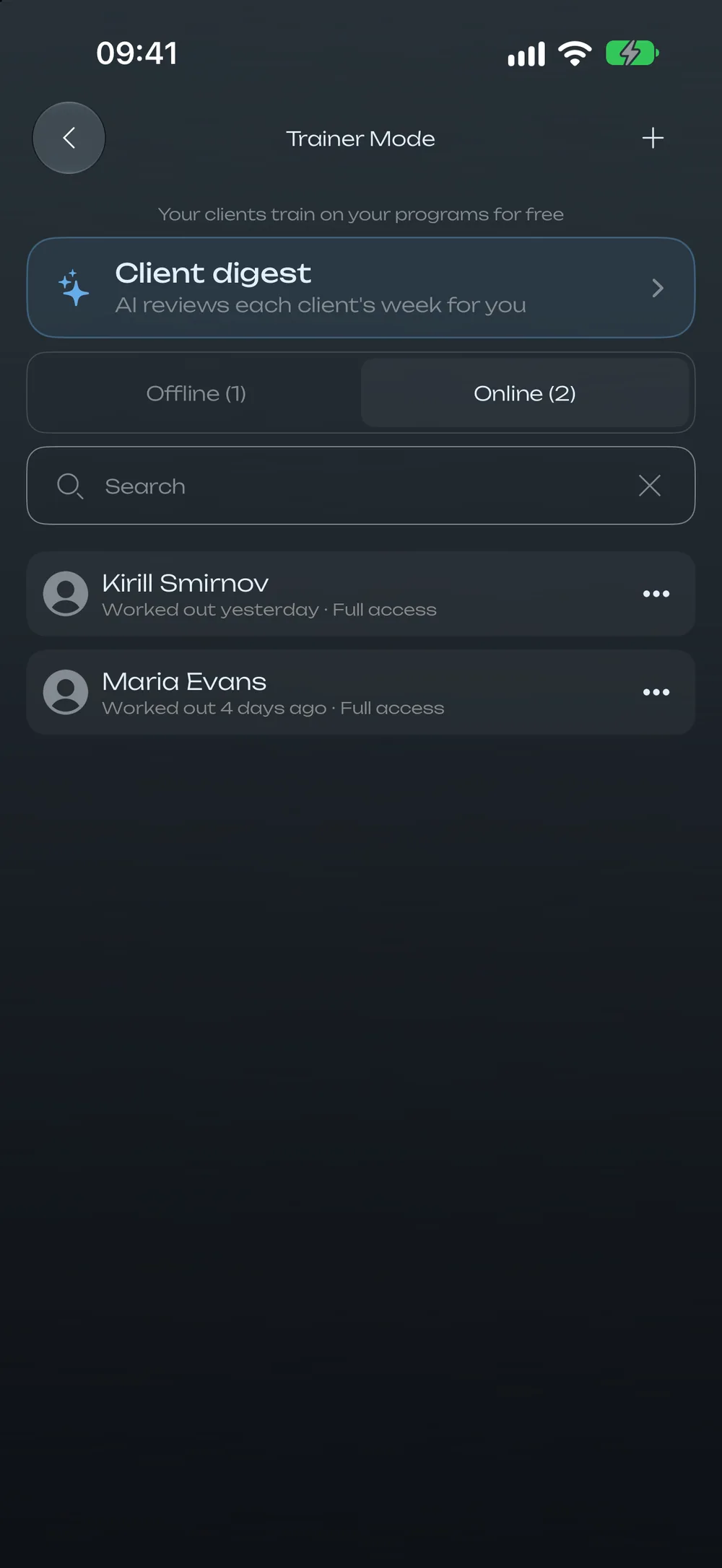
There are two kinds of clients, and you can coach both. Trainer Mode keeps them on two tabs: Offline and Online.
Offline client
You train them in the gym
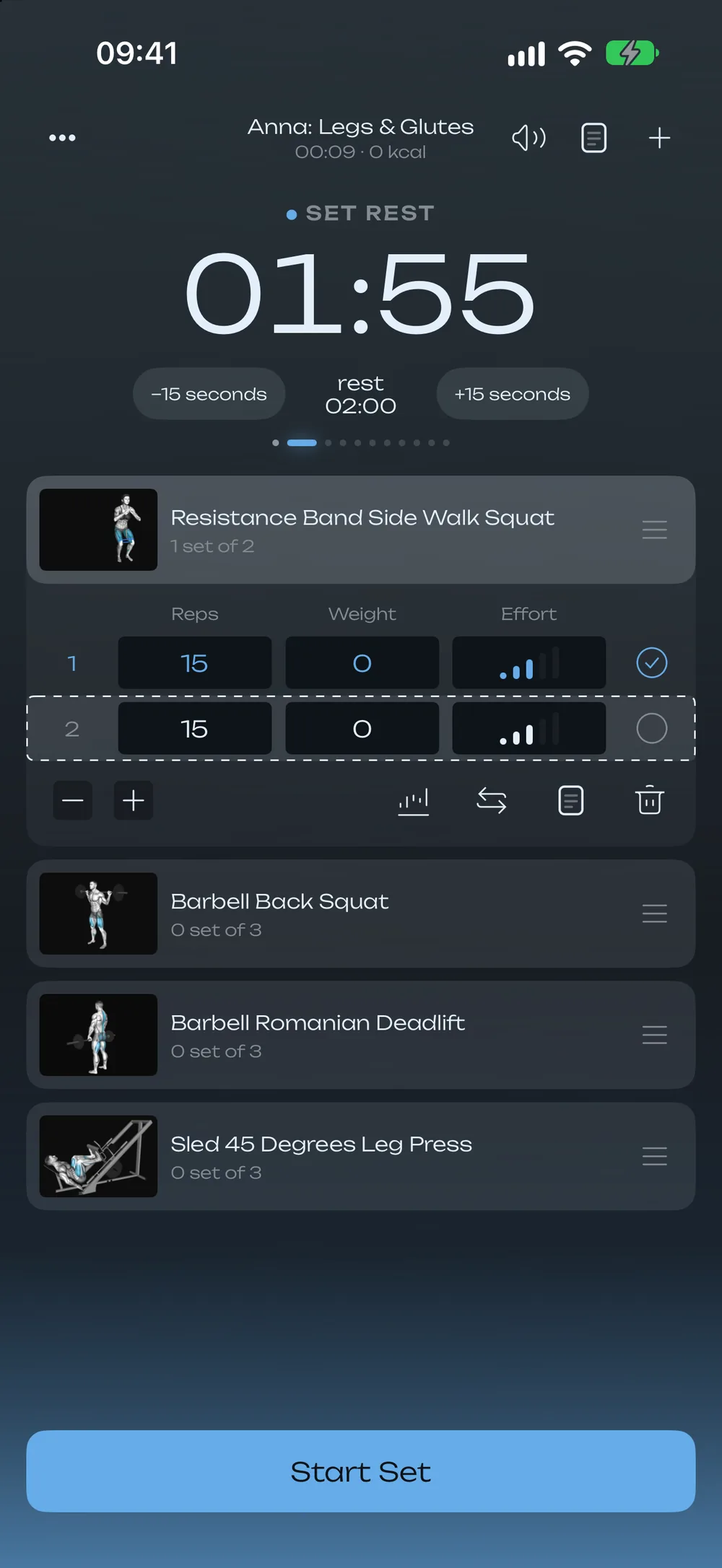
The client needs no app. Create a profile in a minute (name, date of birth, sex, weight and height), open a workout and log the sets for your client. The report lands in their history.
Online client
You coach them remotely
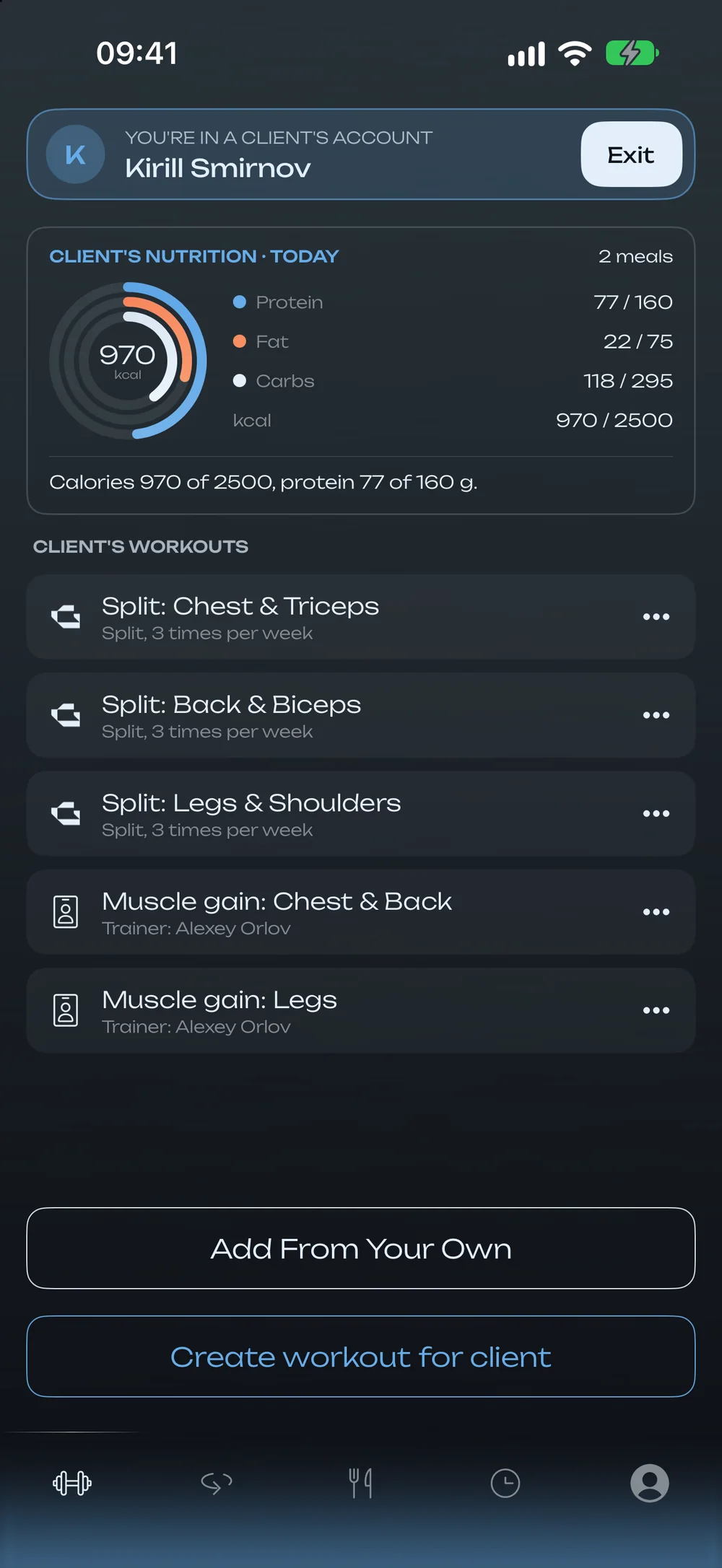
The client has Gloox on their own phone. You add workouts, they see them in their app, train and log the sets, and you see their reports, food and measurements.
| Offline | Online | |
|---|---|---|
| Gloox on the client's phone | not needed | their own, free |
| Who logs the sets | you | the client |
| Program, reports, measurements | yes | yes |
| Food and macro targets | — | if the client shares it |
Clients connect
with one link
Send the invite in any messenger. The client decides what you can see and can change it any time.
- 1
Send a link
Trainer Mode → Online tab → “+”. One link per client. If they don't have Gloox yet, they install it and open the link again.
- 2
The client picks what to share
All workouts or only yours, food, the calorie and macro target, measurements, photos, steps, activity and sleep. Once they accept, they're on your list.
- 3
Or the client invites you
A client with Gloox PRO creates a link for their trainer: Profile → My Trainers. Then you don't need a subscription.
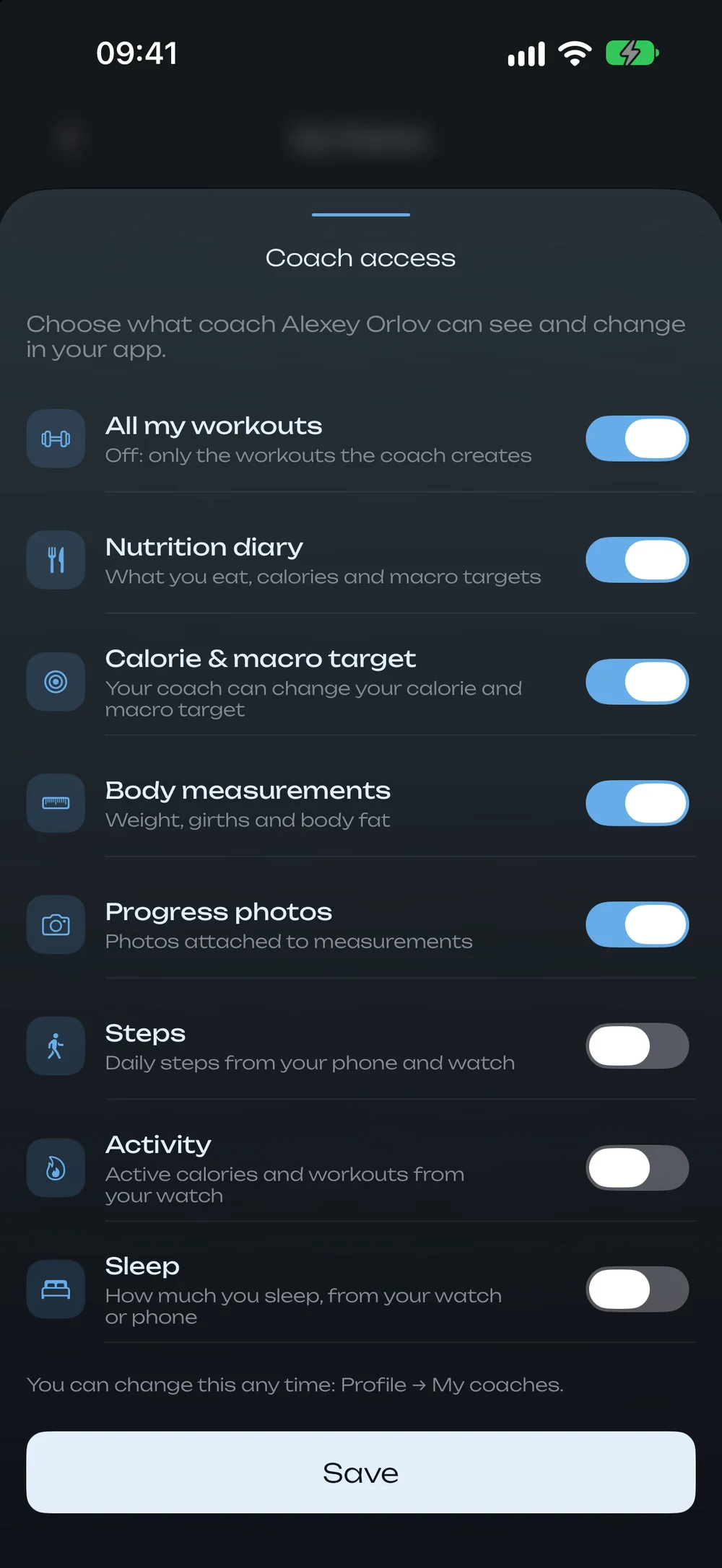
What a client can share
- All workoutsor only the ones you create
- Nutrition diaryfood, calories and macros
- Calorie & macro targetyou can change it
- Body measurementsweight, girths, body fat
- Progress photosphotos attached to measurements
- Stepsfrom the phone and watch
- Activityactive calories, watch workouts
- Sleepfrom the watch or phone
Whatever the client keeps private simply isn't there for you: no Nutrition tab, no photos with measurements. The client's profile tells you what they've closed.
A client's program
in a couple of minutes
The program lives in your client's app, not in a chat thread. Whatever you change, the client sees in their app.
Your video
Your own exercises, with your own video
Add your own exercise and film the technique on your phone or pick a clip from your gallery, up to a minute; Gloox compresses and uploads it. Clients you give the exercise to see the video on the exercise card and right in the workout. A link to a video works too.
From your own workouts
Keep a library in your account and hand it out: tick the workouts, tap “Add to client”. The client sees your name on them, and their edits never touch your original.
Right in the client's account
Create a workout inside their account: 900+ exercises with 3D technique animations, sets, reps and weight. Drag to reorder.
Comments and a private note
Comments on a workout or on any exercise show up in the client's app. The note about the client (injuries, schedule, agreements) is for your eyes only.
A program from a photo or PDF
Program in your notes or a spreadsheet? Send a photo or a PDF to the AI coach chat in your own account. Gloox brings it into the app; then add it to your client.
Everything about a client,
on your phone
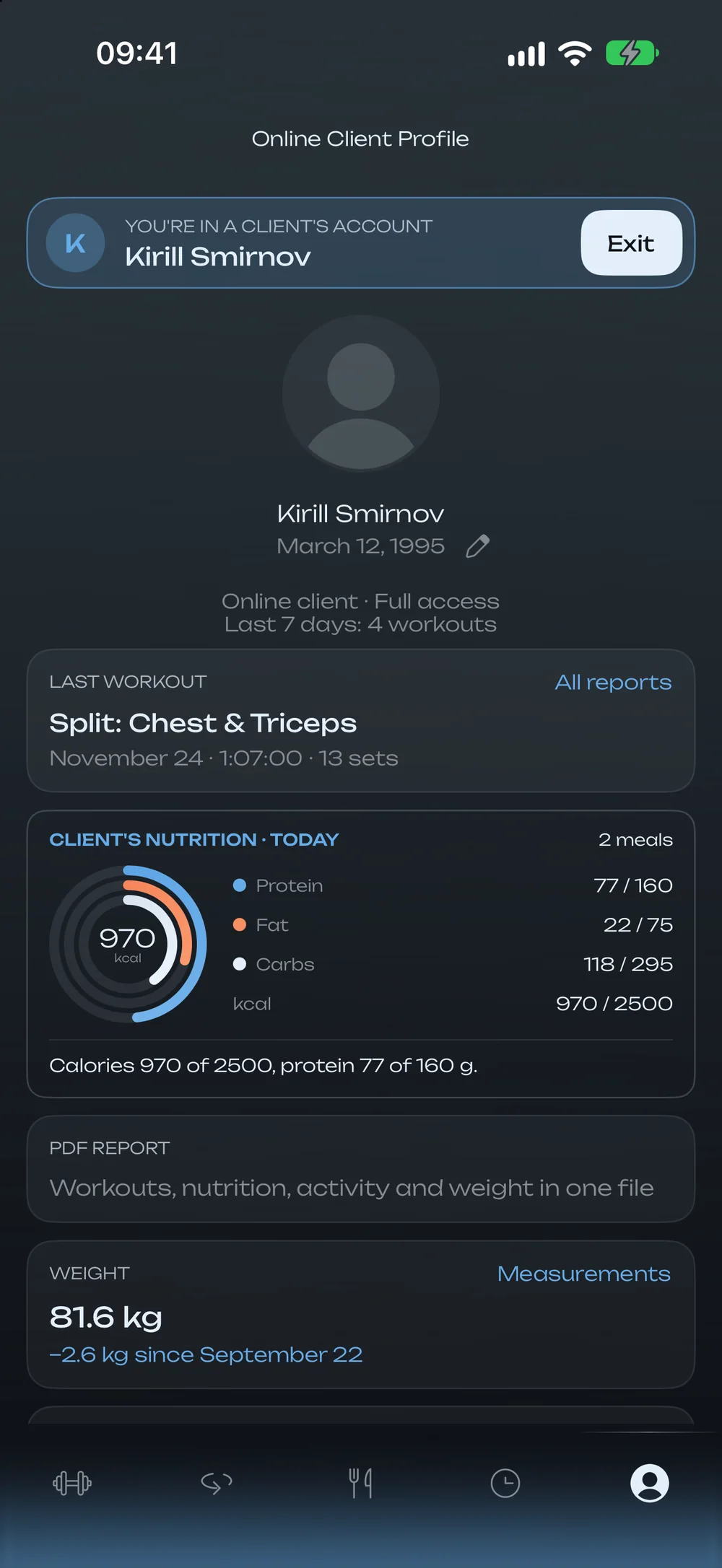
Tap a client and the app switches to their account. A bar with their name stays on top; “Exit” takes you back to yours.
What matters, on one screen
Workouts in the last 7 days, the last workout, food today, weight and how it changed, your note and the program. If the client shares steps, activity and sleep, the weekly averages are here too.
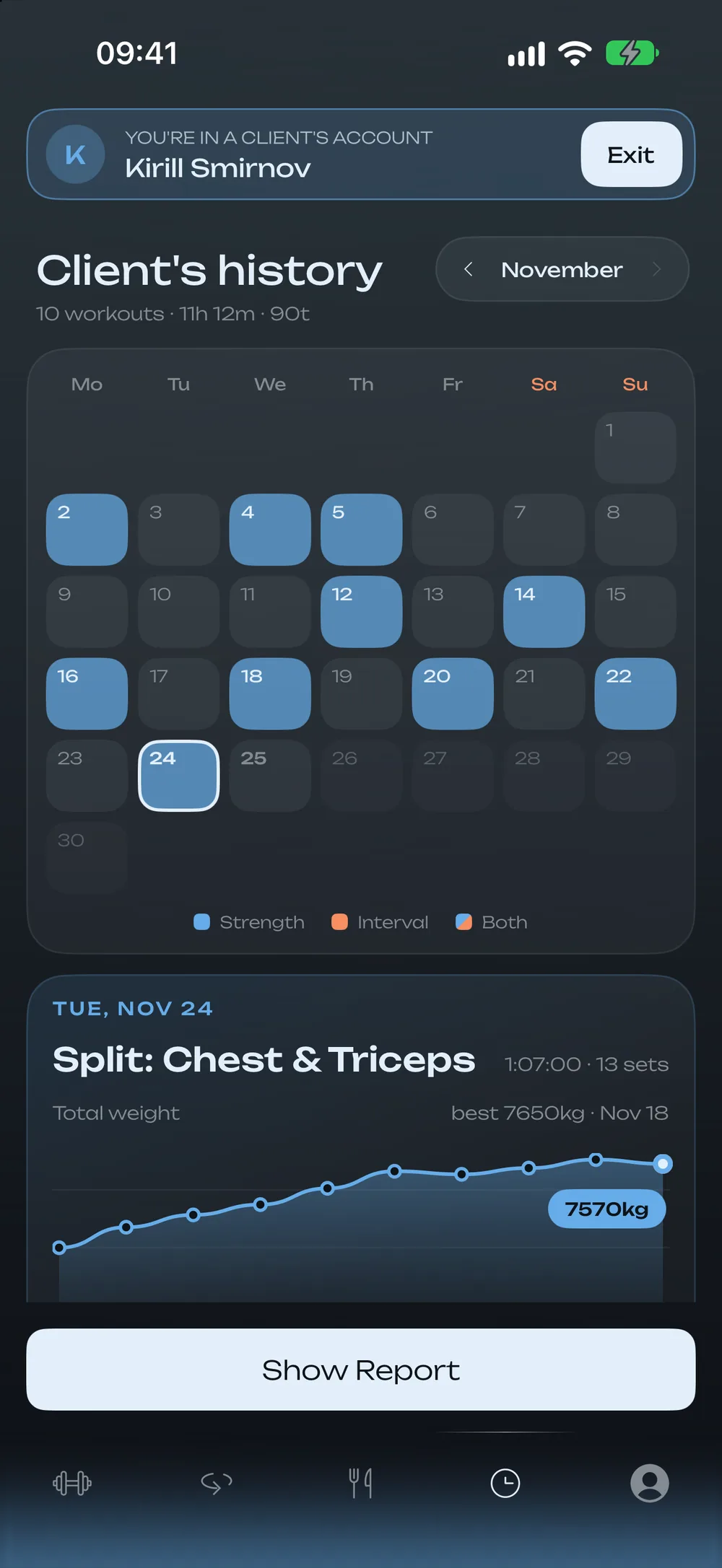
Every workout on a calendar
Workout days are marked in blue; under the calendar, the volume over recent weeks and the best ever. You see at a glance whether the client keeps the rhythm.
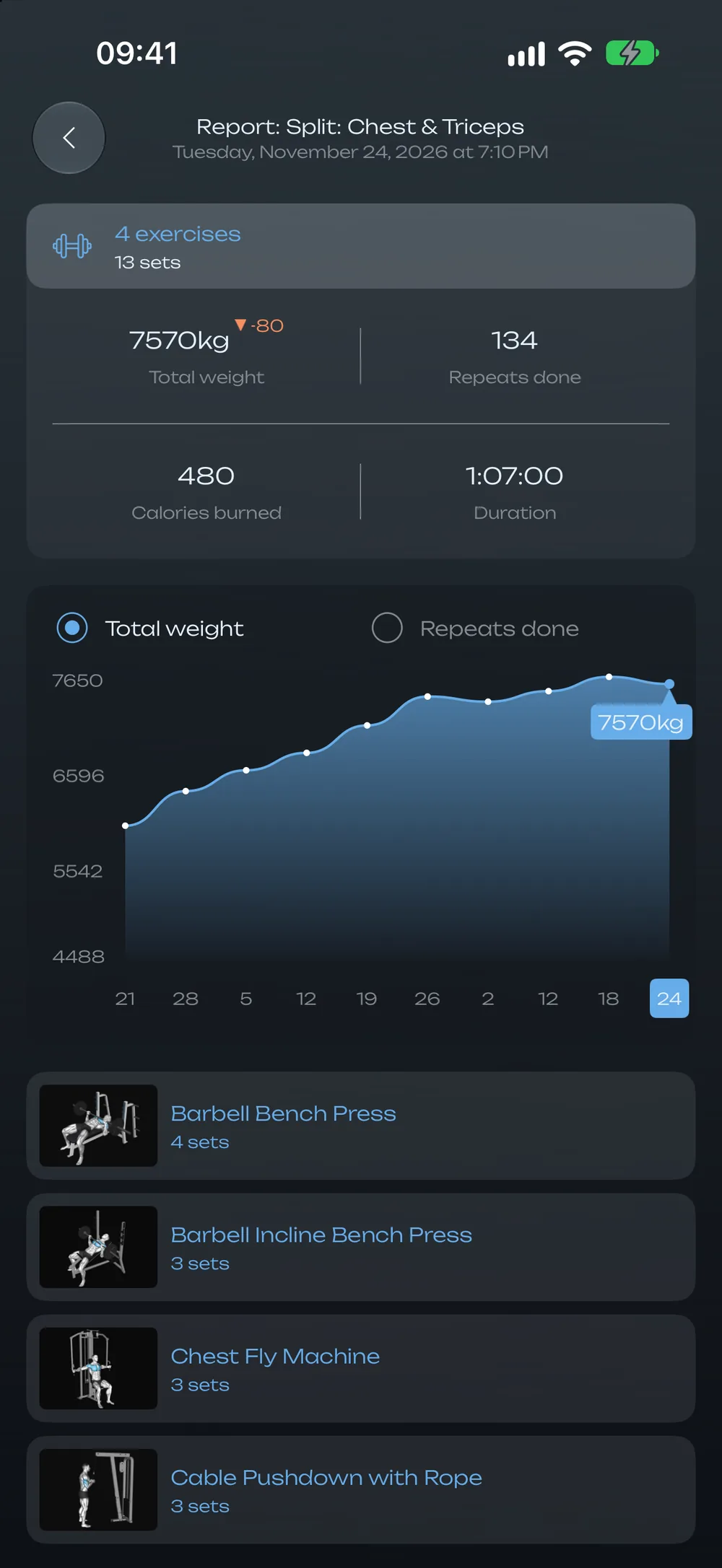
A report for every workout
Volume, reps, calories and time, the change since last time and a chart. Below, every exercise with its sets, weights and best set.
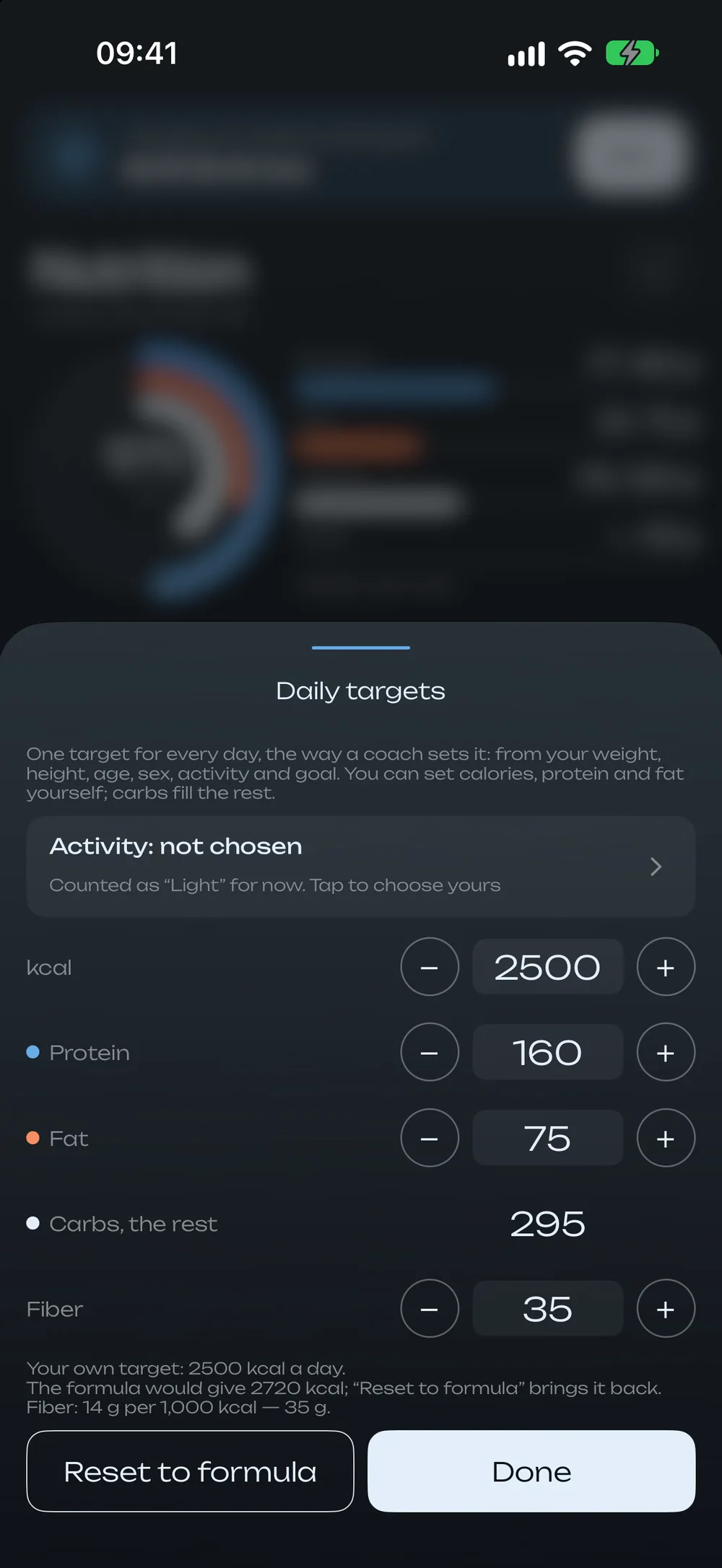
Food diary and macro targets
What the client ate by day and meal, calories and macros against the target. If the client allows it, set calories, protein and fat with − and +; carbs fill the rest.
Your client measures, you see it
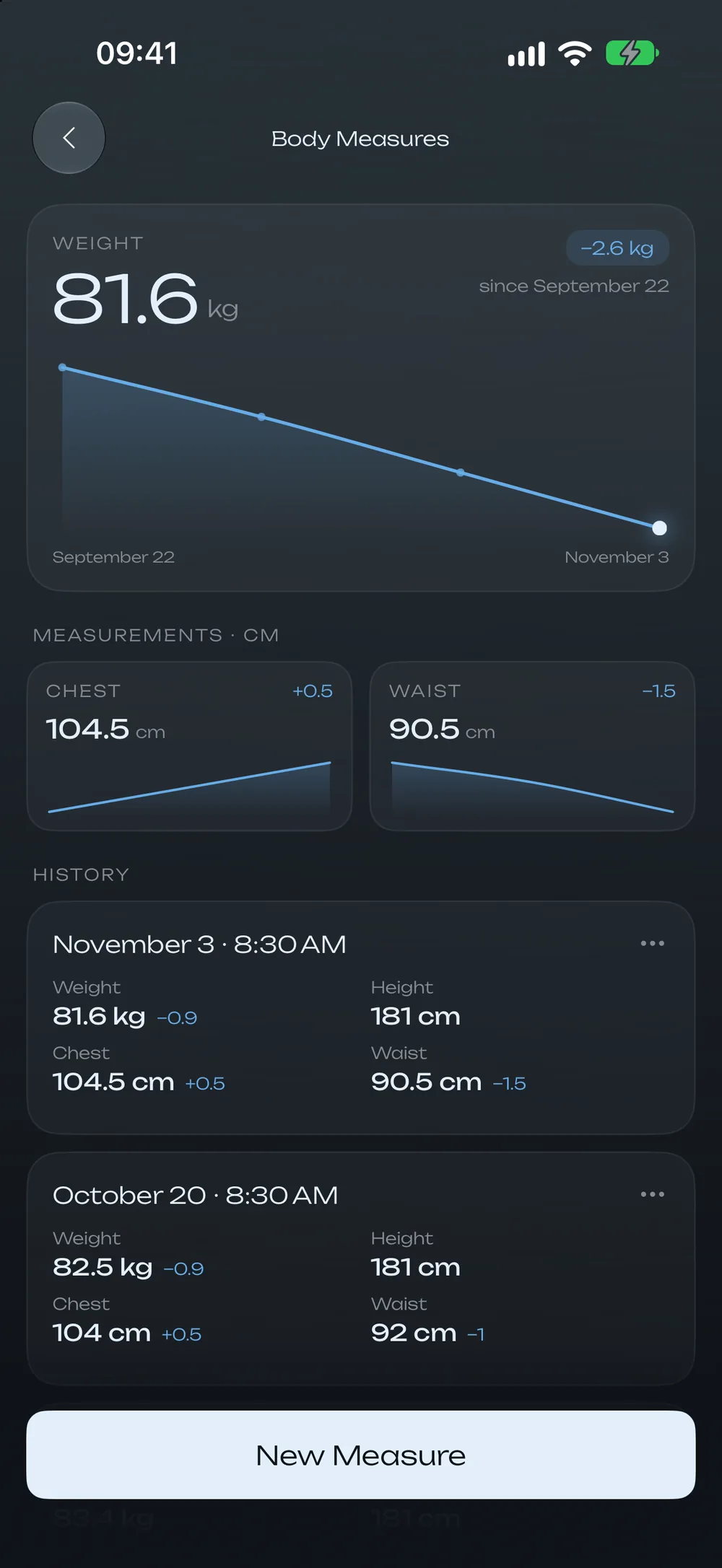
Weight, chest, waist and other girths, body fat and photos the client logs in their app show up for you by date, with a chart and the change since last time. You can add a measurement yourself too, say after a weigh-in at the gym.
A progress report in one file
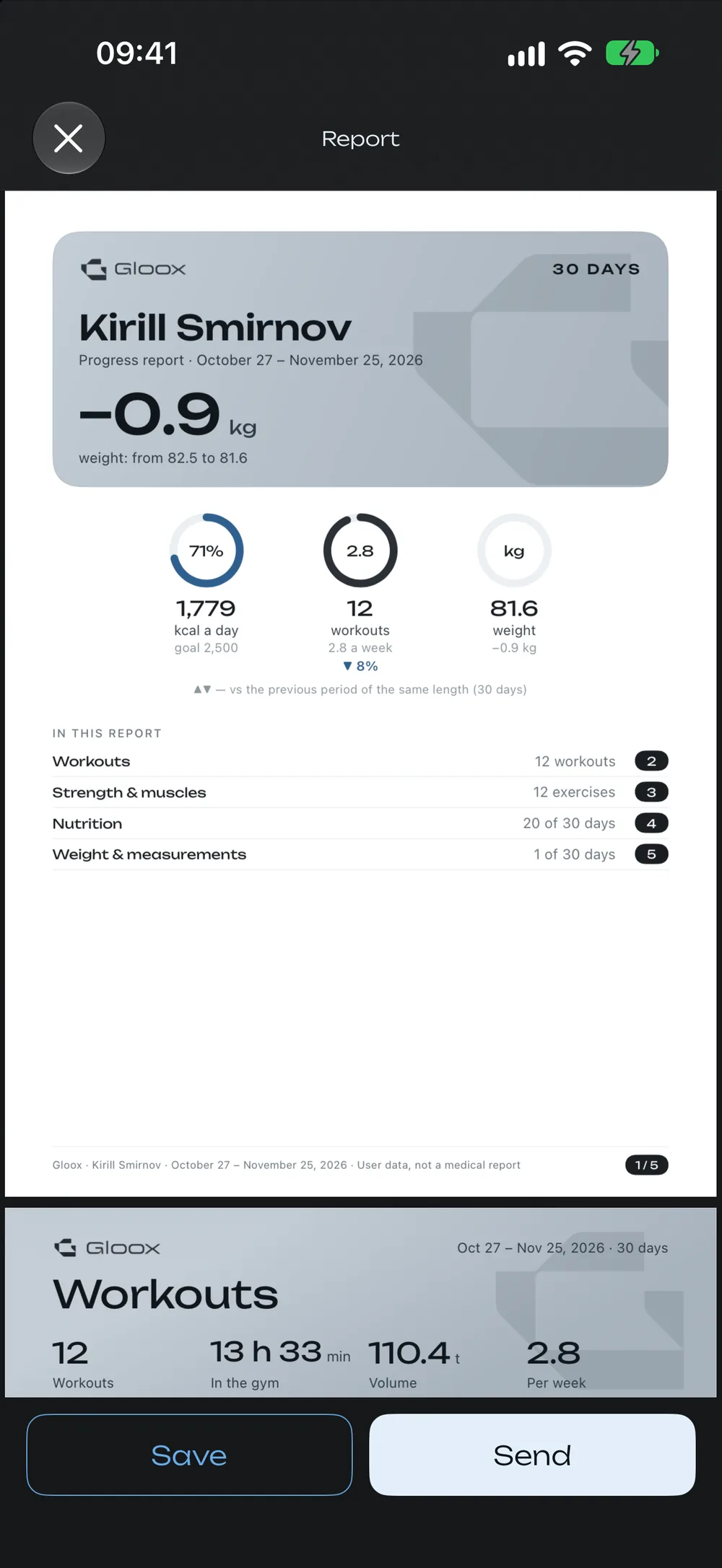
Workouts, strength and muscles, food, weight and measurements for 7 days, 30 days or 3 months in one PDF. Save it or send it to your client right from the app.
See who to message first
in the weekly digest
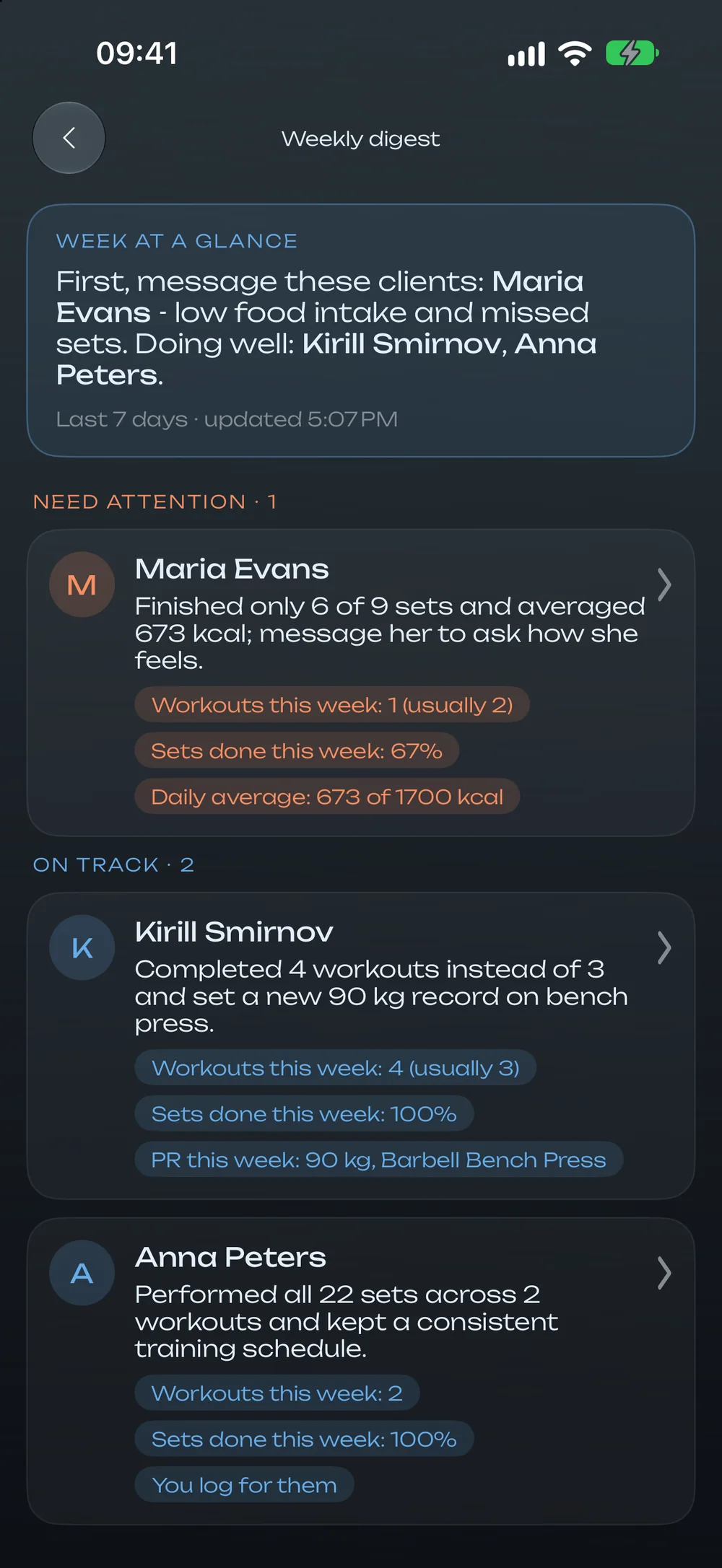
Open the client digest and AI reads each client's week: workouts, sets done, food and records. Tap a card and you're in that client's account.
- Need attentionmissed workouts, too little food, unfinished sets
- On trackplan done, new records
- Quietno workouts in a month
The app counts the numbers, AI writes the text.
You get Gloox PRO.
Your clients pay nothing
For you
Trainer Mode is part of Gloox PRO. The same subscription covers your own training too: the AI coach in the gym, calories from a photo, the coach's voice.
See the price for your country in the App Store or Google Play.
For your clients
Free. While you have PRO, up to 100 clients train on your programs in the free Gloox. Offline clients need no app at all.
Invited by a client
If a client with PRO connects you with their own link, you don't need a subscription.
If your subscription ends, your clients stay on the list and open again once you renew.

And for you: an AI coach
In your own account Max or Eva build your plan, suggest today's weights and count food from a photo. Your workouts and your clients' data never mix.
Questions trainers ask
Trainer Mode is part of Gloox PRO; the App Store and Google Play show the price for your country. Your clients train on your programs for free. If a client with PRO invites you, you don't need a subscription.
No. While your Gloox PRO is active, your clients train on your programs in the free Gloox. An offline client needs no app at all.
Up to 100 clients, gym and online together, train for free on one Gloox PRO subscription.
For managing clients, yes: your client list, their programs and workout history, their food and measurements (if the client shares them) and a private note on each one. Gloox doesn't do booking, schedules or payments, so keep those in a separate tool.
An online client does: Gloox is free on iPhone and Android. An offline client doesn't: you train together in the gym and run everything from your phone.
Only what the client shares: all workouts or only yours, food, the calorie and macro target, measurements, photos, steps, activity and sleep. The client can change it any time: Profile → My Trainers.
Yes. Take a photo of the program or a screenshot of the spreadsheet, or send a PDF, to the AI coach chat in your own account. Gloox brings the program into the app; then open the client and tap “Add From Your Own”.
Yes. Add your own exercise and tap “Upload your own video”: film it on your phone or pick it from your gallery, up to 1 minute. Clients you give the exercise to will see the video on the exercise card and in the workout.
Yes, Trainer Mode is in Gloox on both iPhone and Android. You and your client can use different phones.
In the app: Profile → Coach mode. That's where your client list, invites and the client digest are.
No. Inside a client's account a bar with their name stays on top, and “Exit” takes you back to yours. Your own workouts stay in your account.
Your clients stay on the list and open again once you renew. Clients who invited you themselves stay available without a subscription.
Reading for trainers
- Best apps for personal trainers in 2026Gloox, Trainerize, TrueCoach and Everfit compared
- How to coach clients onlineIntake, program, check-ins, weekly review
- How to write a training program for a clientFrequency, split, volume, weights and progression
- How to track a client's nutritionMacro targets, food diary and a weekly check
- How to move programs from Excel and notesFrom a photo or PDF in minutes
- Free workout log templateExcel and Google Sheets: program, log, progress
Start with one client
Get Gloox, open Profile → Coach mode and send the link to your first client. Or create an offline profile and run a workout in the gym.
On a computer? Point your phone's camera here to get the app.